
Every job board has one endpoint that gets hit far more than the rest: the listing page. Thousands of visitors ask for the same "PHP jobs in Noida" list, and each request runs the same SQL query against the same rows. That is exactly the kind of work a cache is made for.
In this guide we will add Redis caching to a small ASP.NET Core Web API that serves job listings. We will build a reusable cache helper, choose sensible expiry times, clear the cache when data changes, protect the database from a sudden rush of requests, and keep the API alive even when Redis goes down. All code targets .NET 8 or newer.
What we are building
The API has one read endpoint and one write endpoint:
GET /api/jobs/{city}returns active jobs for a city.POST /api/jobsadds a new job.
Reads should come from Redis whenever possible. Writes should make sure no visitor keeps seeing an outdated list.
The pattern we will use is called cache-aside: the application checks the cache first, and only on a miss does it load from the database and then store the result for next time.
Step 1: Run Redis locally with Docker
If you have Docker installed, one command is enough:
docker run --name redis-cache -p 6379:6379 -d redis:7Confirm it is alive:
docker exec -it redis-cache redis-cli ping
# PONG
Step 2: Add the package and register the cache
dotnet add package Microsoft.Extensions.Caching.StackExchangeRedisIn Program.cs:
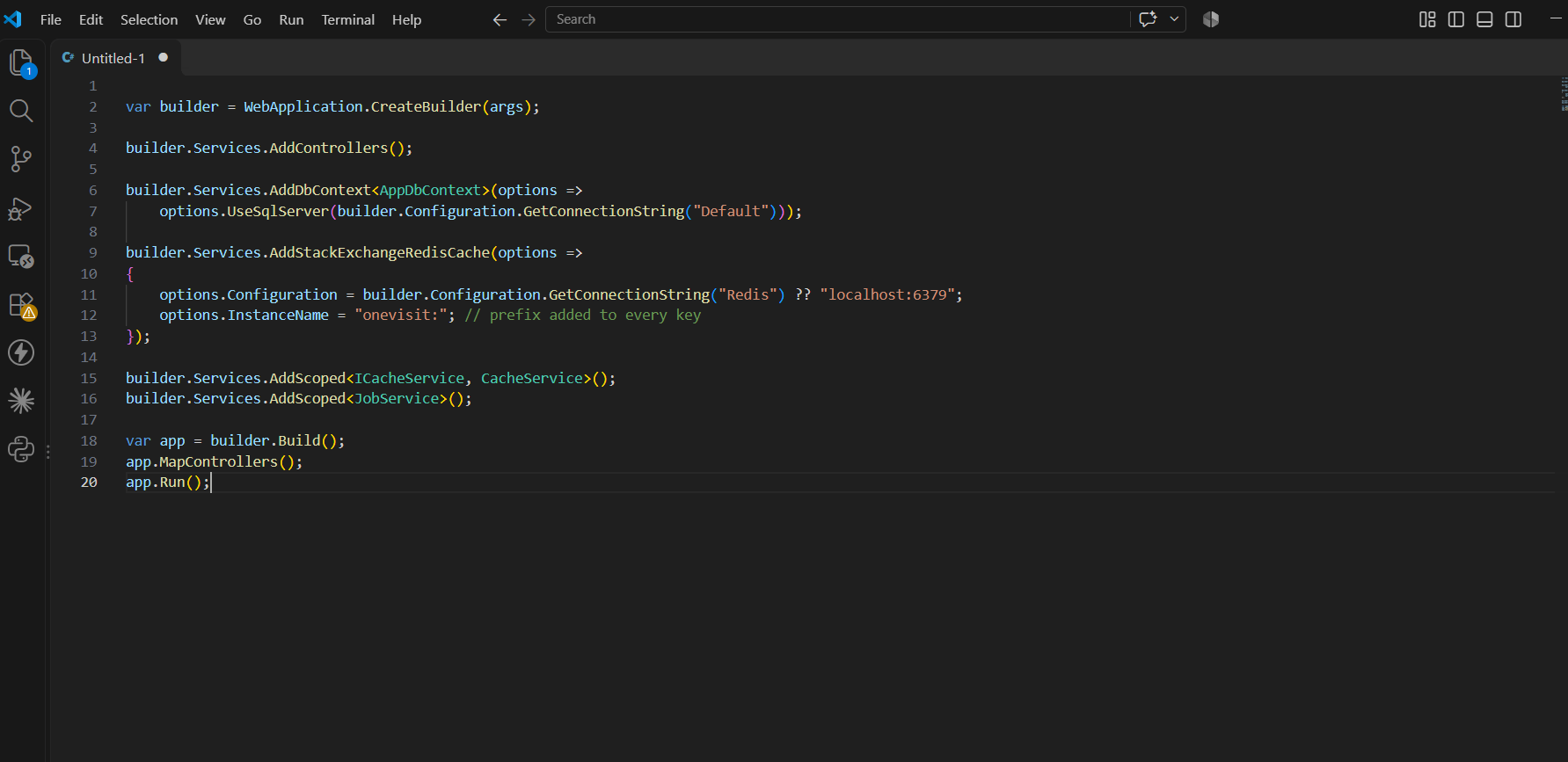
Note that older tutorials use AddDistributedRedisCache. That method is obsolete. AddStackExchangeRedisCache is the current one.
The prefix in InstanceName is useful when several apps share one Redis server: their keys will not collide.
Step 3: Write a small cache helper
We could call IDistributedCache directly in every service, but the same five lines would repeat everywhere. A single helper keeps the logic in one place.
Three small decisions in this class are worth explaining.
It fails open. Every Redis call is wrapped in try/catch. If Redis is down, the request simply falls through to the database. The site becomes slower, but it does not go offline. A cache should never be the reason your API returns a 500.
It guards against a stampede. Imagine a popular key expires and 200 requests arrive in the same moment. Without protection, all 200 run the database query. With the per-key lock, one request rebuilds the value while the others wait, then read the fresh copy from Redis. Note that this lock works inside one server process. If you run several instances, each instance will rebuild once, which is still a big improvement over 200.
It adds jitter. If you cache 50 city lists with exactly ten minutes of expiry, they all expire together and the database gets hit by 50 queries at once. A random extra 0 to 59 seconds spreads that load out.
Step 4: Use the helper in a service
public record JobDto(int Id, string Title, string City, DateTime PostedOn);

public class JobService
{
    private readonly AppDbContext _db;
    private readonly ICacheService _cache;

    public JobService(AppDbContext db, ICacheService cache)
    {
        _db = db;
        _cache = cache;
    }

    private static string CityKey(string city) =>
        $"jobs:city:{city.Trim().ToLowerInvariant()}";

    public Task<List<JobDto>?> GetByCityAsync(string city)
    {
        return _cache.GetOrCreateAsync(
            CityKey(city),
            () => _db.Jobs
                .AsNoTracking()
                .Where(j => j.City == city && j.IsActive)
                .OrderByDescending(j => j.PostedOn)
                .Select(j => new JobDto(j.Id, j.Title, j.City, j.PostedOn))
                .ToListAsync(),
            ttl: TimeSpan.FromMinutes(10));
    }

    public async Task<Job> CreateAsync(Job job)
    {
        _db.Jobs.Add(job);
        await _db.SaveChangesAsync();

        // The list for this city is now out of date, so remove it
        await _cache.RemoveAsync(CityKey(job.City));
        return job;
    }
}
Two things to notice. We cache a JobDto, not the Entity Framework entity. Entities often carry navigation properties that create circular references and make JSON serialization fail, and they hold more data than the page needs. And the cache key is built in exactly one place (CityKey), so the read and the invalidation can never drift apart.
The controller stays thin:
[ApiController]
[Route("api/jobs")]
public class JobsController : ControllerBase
{
    private readonly JobService _jobs;
    public JobsController(JobService jobs) => _jobs = jobs;

    [HttpGet("{city}")]
    public async Task<IActionResult> Get(string city) =>
        Ok(await _jobs.GetByCityAsync(city));

    [HttpPost]
    public async Task<IActionResult> Create(Job job) =>
        Ok(await _jobs.CreateAsync(job));
}
Step 5: Look inside Redis
After calling the endpoint once, open the Redis CLI:
docker exec -it redis-cache redis-cli127.0.0.1:6379> KEYS onevisit:*
1) "onevisit:jobs:city:noida"
127.0.0.1:6379> TTL onevisit:jobs:city:noida
(integer) 587
127.0.0.1:6379> HGETALL onevisit:jobs:city:noidaA common surprise here: if you run GET on that key you get a WRONGTYPE error. The ASP.NET Core Redis cache stores each entry as a hash (with fields for the data and the expiry settings), so use HGETALL. Also, use KEYS only on your local machine. On a busy production server it blocks Redis while it scans every key.
Step 6: Measure it yourself
Do not trust a tutorial's timings, including this one. Measure your own setup:
# first call: cache miss, goes to the database
curl -s -o /dev/null -w "%{time_total}s\n" http://localhost:5000/api/jobs/noida

# second call: cache hit, served from Redis
curl -s -o /dev/null -w "%{time_total}s\n" http://localhost:5000/api/jobs/noida
Run each a few times and note the difference. Your numbers depend on the query, the data size and where Redis runs.
Beyond strings: a "most viewed jobs" list with a sorted set
Caching query results is only one use of Redis. Its data structures can do work that would be awkward in SQL. A sorted set is perfect for a leaderboard such as the most viewed jobs.
This part uses the StackExchange.Redis client directly. Register one shared connection, because creating a new connection per request is a classic performance bug:
builder.Services.AddSingleton<IConnectionMultiplexer>(_ =>
    ConnectionMultiplexer.Connect("localhost:6379"));
builder.Services.AddScoped<TrendingService>();
using StackExchange.Redis;
public class TrendingService
{
private const string Key = "jobs:views";
private readonly IDatabase _db;
public TrendingService(IConnectionMultiplexer mux) => _db = mux.GetDatabase();
// Call this whenever a job page is opened
public Task RecordViewAsync(int jobId) =>
_db.SortedSetIncrementAsync(Key, jobId, 1);
public async Task<List<(int JobId, double Views)>> TopAsync(int count = 5)
{
var top = await _db.SortedSetRangeByRankWithScoresAsync(
Key, 0, count - 1, Order.Descending);
return top.Select(x => ((int)x.Element, x.Score)).ToList();
}
}Each view increments a score, and Redis keeps the set ordered for you. Fetching the top five is a single fast call, with no GROUP BY and no table scan.
A newer option: HybridCache
In newer versions of .NET, HybridCache combines a small in-process cache with a distributed one such as Redis, and it has stampede protection built in. If you are on a version that supports it, it can replace much of the helper we wrote:
builder.Services.AddHybridCache();

// inside a service that receives HybridCache
var jobs = await _hybridCache.GetOrCreateAsync(
    $"jobs:city:{city}",
    async ct => await LoadJobsFromDbAsync(city, ct),
    new HybridCacheEntryOptions { Expiration = TimeSpan.FromMinutes(10) });
Building the helper by hand is still worth doing once, because it shows you what the library is doing for you.
Common mistakes to avoid
- No expiry at all. A key without a time limit stays until you remember to delete it, and stale data lives forever.
- Caching user-specific data under a shared key. If the response depends on who is logged in, include the user id in the key, or do not cache it.
- Caching huge objects. Large payloads cost network time and memory. Cache the trimmed DTO the page needs.
- Forgetting invalidation. A fast but wrong answer is worse than a slow correct one. Every write path that changes cached data should clear the matching key.
- A new
ConnectionMultiplexerper request. Create it once and reuse it. - Treating Redis as the source of truth. A cache can be emptied at any time. Your database must always be able to rebuild what is in it.
Conclusion
With a cache-aside helper, sensible expiry, jitter, a per-key lock and a fail-open design, Redis becomes a safe speed boost instead of a new point of failure. Start with the one endpoint that gets the most traffic, measure before and after, and expand from there. Once that works, try the sorted-set trick for leaderboards and rankings, which is where Redis starts doing things your SQL database cannot do as cheaply.